
Your Biggest Data Security Blind Spot May Be the Screen

The screen is where traditional security ends and where data exposure begins. Protect sensitive customer and financial information while it’s being viewed with Fasoo Smart Screen.

Is Your Organization Screen-Secure?

Check each protection your organization already has in place. We'll show how well your sensitive data is protected from screen-based exposure.

Your Screen Readiness Score

0%

High Risk

Your organization has minimal protection against screen-based data exposure. Sensitive information displayed on screens can be easily captured, shared, or leaked without accountability.

Recommended Next Step

Get a Demo

How It Works

Explore four steps from policy to proof.

1

SPECIFY

Choose what to protect

Select the applications, websites, URLs, and business systems, such as core banking, CRM, EMR, and claims platforms, that display sensitive customer data, or protect them all.
2

SET A POLICY

Decide the rules

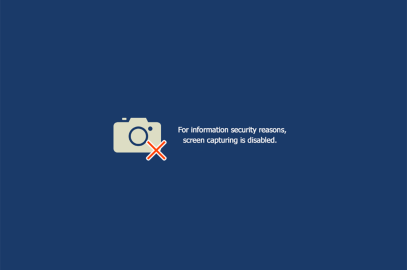
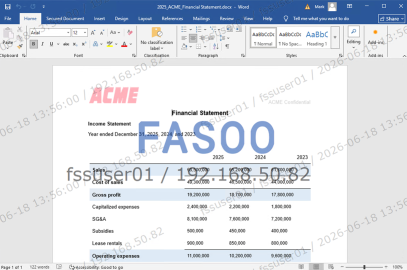
For each target, choose what happens: block screen capture, apply a visible watermark, embed an invisible watermark, or combine multiple controls.
3

APPLY

Roll it out

Deploy policies through an endpoint client, on the server, or via API integration without changing how employees work.
4

TRACE

Block, watermark, and log

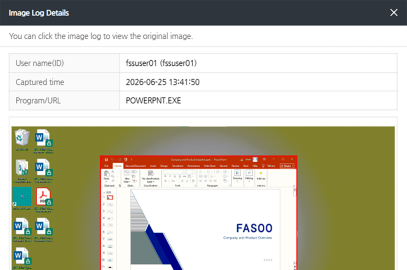
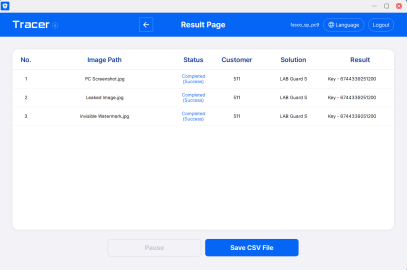
Screen-capture attempts are blocked and watermarked in real time, while every action is logged with user, IP, and timestamp for chain of custody and forensic traceability.

Can You Trace a Leaked Screenshot Back to the Source?

Resources

FAQ

Will Fasoo Smart Screen (FSS) affect the performance of core banking, claims, or CRM systems?

No. FSS protects information at the viewing layer without requiring changes to underlying business applications. Organizations can apply screen security policies without disrupting day-to-day operations.

Yes. FSS supports Windows, macOS, iOS, and Android, and works across virtual desktop, VPN, and remote work environments. Organizations can apply consistent screen security policies regardless of where employees access sensitive information.

FSS cannot physically disable a smartphone camera. However, it can block screenshots and screen-recording tools, apply visible watermarks, and embed forensic watermarks that help identify the source of leaked screen content, even when it is photographed.

Visible watermarks display information such as the user’s identity, IP address, or timestamp directly on the screen to discourage unauthorized capture. Forensic watermarks are embedded invisibly and can be used to trace leaked images back to the originating user, device, or session.

FSS is deployed through a lightweight endpoint agent managed by a centralized policy server. Organizations can apply screen security policies across users, applications, and systems from a single console, with updates and policy changes managed centrally.

Yes. FSS helps organizations reduce the risk of unauthorized exposure of personal and sensitive information displayed on screens. Features such as dynamic watermarking, screen-capture controls, and detailed audit logs support privacy, security, and accountability requirements associated with regulations such as GDPR, PDPA, HIPAA, DPDP Act, and similar data protection frameworks worldwide.

FSS also provides audit trails that help organizations demonstrate who accessed sensitive information, when access occurred, and whether screen-capture attempts were made. While FSS can support compliance initiatives, compliance ultimately depends on an organization’s overall policies, processes, and controls.

See FSS Live

A demonstration is worth a thousand words.

Schedule a 30-minute demo with one of our screen security experts! We will show you how Fasoo Smart Screen can secure sensitive data on screen wherever it travels.

Keep me informed

Loading form...

Privacy Overview

This website uses cookies so that we can provide you with the best user experience possible. Cookie information is stored in your browser and performs functions such as recognising you when you return to our website and helping our team to understand which sections of the website you find most interesting and useful.

Strictly Necessary Cookies

Strictly Necessary Cookie should be enabled at all times so that we can save your preferences for cookie settings.

3rd Party Cookies (Analytics)

This website uses Google Analytics to collect anonymous information such as the number of visitors to the site, and the most popular pages.

Keeping this cookie enabled helps us to improve our website.